Source: Connect to the host machine from a VirtualBox guest OS
See "Another way to do this is to use a "Host" type of virtual network."
The simplest to always get the same IP address @home and @office for your VM is to use the Host-only adapter.

A bozo's blog
Showing posts with label virtualbox. Show all posts
Showing posts with label virtualbox. Show all posts
Wednesday, July 4, 2018
Sunday, November 15, 2015
Virtualbox centos: Device eth0 does not seem to be present
If, when copying a VM from one computer to another one, you face this error:
Then ensure first that /etc/sysconfig/network-scripts/ifcfg-eth0 has the same MAC address as in Virtualbox network settings, plus
service network restart
...
Bringing up interface eth0: Device eth0 does not seem to be present, delaying initialization.
Then ensure first that /etc/sysconfig/network-scripts/ifcfg-eth0 has the same MAC address as in Virtualbox network settings, plus
rm /etc/udev/rules.d/70-persistent-net.rules
Thursday, August 27, 2015
Thursday, March 5, 2015
Virtualbox: Shrinking VM Disk Images
Source: http://snippets.khromov.se/shrinking-a-virtualbox-linux-image-with-zerofree/
After we find our partition run zerofree to zero out the free space. In our example we will run it on the LVM root partition
Finally, boot down your virtual machine, and run VBoxManage on the host to resize the .vdi file
NB: The other method mentioned on the net replacing zerofree with dd like in
- Download the SystemRescueCd Live Image Mount it as a CD on your virtual machine and boot into the live distro
- Find all available partition and LVM (volume groups) with:
fdisk -lzerofree -v /dev/mapper/vg_rheldev-lv_rootC:\>"c:\Program Files\Oracle\VirtualBox\VBoxManage.exe" modifyhd "c:
\Users\jerome\VirtualBox VMs\Monster\Mobiquithings.vdi" --compactNB: The other method mentioned on the net replacing zerofree with dd like in
dd -if /dev/zero -of /bigemptyfile -bs 4096; rm /bigemptyfileMonday, February 23, 2015
Windows Virtualbox: increase CentOS 6 VDI size
- Create a new VDI disk under Controller: SATA, sized appropriately
- Clone existing VDI into new one
- Remove legacy VDI
- Download GParted ISO from GParted Live CD
- Mount GParted ISO under Controller: IDE
- Start the VM, which will boot on the GParted live CD
- Extend the existing LVM2 partition (/dev/sda2) with the new unallocated space
- Stop the VM, detach the GParted ISO, and reboot the VM
- Extend the logical volume into the resized partition By default, CentOS uses LVM (Logical Volume Manager), which requires an extra step.
- Resize file system


C:\Program Files\Oracle\VirtualBox> VBoxManage.exe clonehd "c:\Users\jerome\VirtualBox VMs\Mathusalem\Mathusalem.vdi" --existing "c:\Users\jerome\VirtualBox VMs\Mathusalem\Mathusalem 2.vdi"

0%...10%...20%...30%...40%...50%...60%...70%...80%...90%...100%
Clone hard disk created in format 'VDI'. UUID: 48da07eb-3395-4fad-95e3-c0615b185da2

Identify the name of the logical volume via df:
df -h
Then force the LVM volume to take 100% of the available space on the partition:
lvextend -l +100%FREE /dev/mapper/vg_mathusalem-lv_rootresize2fs /dev/mapper/vg_mathusalem-lv_rootAfter this step, we are now good to go.
Thursday, July 24, 2014
CentOS / VirtualBox: copy paste shit from/to Windows and urxvt
#! /usr/bin/perl

sub on_sel_grab {
    my $query = quotemeta $_[0]->selection;
    $query =~ s/\n/\\n/g;
    $query =~ s/\r/\\r/g;
    system( "echo -en " . $query . " | xsel -ibp" );
}urxvt*perl-ext-common: default,matcher,clipboardFriday, January 17, 2014
VirtualBox: force guest IP address
> sudo vi /etc/sysconfig/network-scripts/ifcfg-eth0DEVICE=eth0 HWADDR=08:00:27:B5:56:05 NM_CONTROLLED=no ONBOOT=yes BOOTPROTO=static #IPADDR=192.168.2.8 IPADDR=192.168.1.101 NETMASK=255.255.255.0 TYPE=Ethernet DNS1=8.8.8.8 DNS2=8.8.4.4Then restart network
> sudo service network restartWednesday, October 23, 2013
Virtualbox: use host VPN
Configuration: Windows 7 host, Fedora guest
Configure a new NAT adapter in Virtualbox network settings.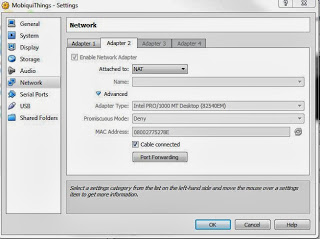
Start the VPN on Windows.
Start the VM.
Configure a new NAT adapter in Virtualbox network settings.

Start the VPN on Windows.
Start the VM.
> cd /etc/sysconfig/network-scripts
> sudo vi ifcfg-eth1
DEVICE=eth1 NM_CONTROLLED=no ONBOOT=yes BOOTPROTO=dhcp DNS1=8.8.8.8 DNS2=8.8.4.4 TYPE=Ethernet USERCTL=no PEERDNS=yes IPV6INIT=no
> sudo ifup eth1> ping engine1Monday, July 2, 2012
VirtualBox Guest additions upgrade: install_x11_startup_app: no script given
Here's what we get after trying to upgrade the Guest Additions from 4.1.12 to 4.1.14:
Installing the Window System drivers
Installing X.Org Server 1.11 modules ...done.
Setting up the Window System to use the Guest Additions ...done.
You may need to restart the hal service and the Window System (or just restart
the guest system) to enable the Guest Additions.

Installing graphics libraries and desktop services components ...fail!
(See the log file /var/log/vboxadd-install-x11.log for more information.)
Press Return to close this window...

install_x11_startup_app: no script given rm /usr/lib64/VBoxGuestAdditions
rm /usr/share/VBoxGuestAdditionsThursday, April 26, 2012
Force resync of VirtualBox guest
E.g. To force time sync every 10 sec.:
VBoxService --timesync-set-threshold 10000Thursday, March 15, 2012
Copy Paste shit in Virtualbox
VirtualBox host =Windows 7
VirtualBox Guest = Fedora 14 with OpenBox and Eterm
Basically, no selection you make in Eterm can be copied with Ctrl-Ins the expected way into Windows.
Copy Paste Hell Between Windows Host and Linux Guest in VirtualBox gave me part of the solution:
Install xsel with:
In ~/.config/openbox/rc.xml, add the following:
VirtualBox Guest = Fedora 14 with OpenBox and Eterm
Basically, no selection you make in Eterm can be copied with Ctrl-Ins the expected way into Windows.
Copy Paste Hell Between Windows Host and Linux Guest in VirtualBox gave me part of the solution:
Install xsel with:
> sudo yum -y install xsel> xsel | xsel -bIn ~/.config/openbox/rc.xml, add the following:
    <keybind key="C-Insert">
      <action name="Execute">
        <startupnotify>
          <enabled>true</enabled>
          <name>xsel</name>
        </startupnotify>
        <command>sh -c '/usr/bin/xsel | /usr/bin/xsel -b'</command>
      </action>
    </keybind>
Do not forget the sh -c or it won't work.
Tuesday, February 21, 2012
Resize a Fedora .vdi file in Oracle VM VirtualBox 4.1.8
The LVM system file used by Fedora is not supported by GParted.
In order to add the new volume to the existing partition, we need to use system-config-lvm.
In order to add the new volume to the existing partition, we need to use system-config-lvm.
sudo yum -y install system-config-lvmprocess 702: D-Bus library appears to be incorrectly set up; failed to read
machine uuid: Failed to open "/var/lib/dbus/machine-id": No such file or directory.> dbus-uuidgen > /var/lib/dbus/machine-idMonday, January 23, 2012
Update VirtualBox to 4.1.8
- Download VirtualBox-4.1.8-75467-Win.exe
- Download VBoxGuestAdditions_4.1.8.iso
Unmount the VBoxGuestAdditions.iso under "Parameters | Storage | IDE Controller"- Do the update of VirtualBox
- Restart VirtualBox
Copy the new VBoxGuestAdditions ISO into c:\program files\oracle\virtualbox- Mount the new VBoxGuestAdditions ISO under "IDE Controller"
- Start the new VM
- Re-install VBoxLinuxAdditions like previously done:
sudo mount /dev/cdrom /media/cdrom
cd /media/cdrom
sudo ./VBoxLinuxAdditions.run
sudo reboothttp://www.if-not-true-then-false.com/2010/install-virtualbox-guest-additions-on-fedora-centos-red-hat-rhel/
Thursday, January 19, 2012
GWT debugging on Windows in a VirtualBox Linux VM
This post shows how to use a browser on a host (Windows 7) with Eclipse running a GWT project on the VirtualBox guest (Ubuntu server).
Below, my Ubuntu guest has been named "fart".


Sunday, November 27, 2011
Monday, September 5, 2011
How to access a guest Ubuntu web server installed in VirtualBox from a Windows 7 host OS
1) Reserve the IP address of the VirtualBox VM in the router DNS, e.g. 192.168.1.103
2) In C:\windows\system32\drivers\etc\hosts, add
2) In C:\windows\system32\drivers\etc\hosts, add
192.168.1.103 fart.ulticom.com
Then http://fart.ulticom.com on W7 will match the root document of the Apache web server on Ubuntu.
Wednesday, April 6, 2011
Subscribe to:
Posts (Atom)